
Workday in progress08:02 → 17:05
08h 18m
Clock-ins, clock-outs and breaks, keeping attendance separate from the work carried out.
Working hours happen outside a spreadsheet.
Colorario is an employee time tracking app for recording working hours and project time. Clock in and out, keep breaks separate and track time by project or activity. Instead of just a list of hours, get a clear record of your day that you can review and connect to Odoo.
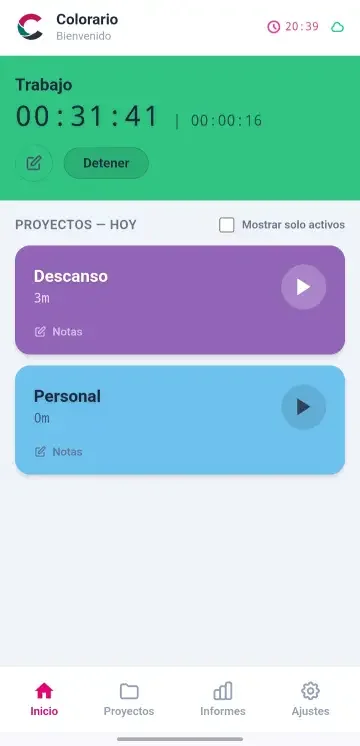
Start with the essentials: clock in, stop or switch activities, and get on with your work. Your time is recorded as you go, so there is no need to chase timesheets at the end of the week.
Clock-ins, clock-outs and breaks, keeping attendance separate from the work carried out.
Breaks no longer get buried in project time.
Each time segment can show the project, task or activity you worked on.
Geolocation is an optional feature you can configure for relevant events.
Review time by day, week, month, project or activity. Distinguish the working day, client work, internal tasks and breaks.
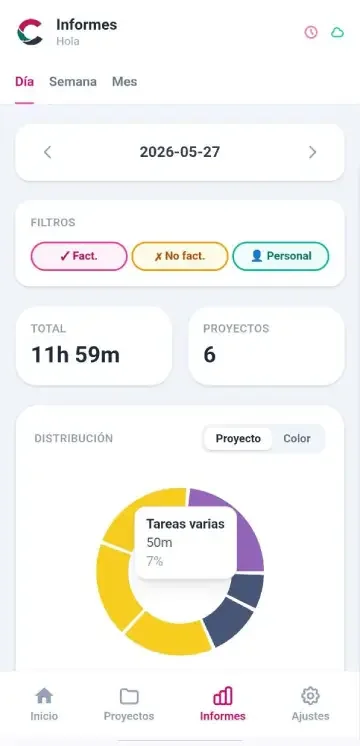
A report does not replace your judgement. But it keeps your decisions from depending on memory, scattered messages or an unfinished spreadsheet.
Colorario and Odoo work together in three distinct areas. Each addresses a different business need, keeping scheduling, projects and attendance clear and separate.
Explore all integrations →Compare scheduled visits, appointments or support with the time actually recorded.
Explore this areaSee which clients, projects and tasks your working time goes into.
Explore this areaKeep schedules, attendance, breaks and leave separate from productivity and timesheets.
Explore this areaWhether you work alone, in a team or across a company, time tracking should provide value without becoming a burden.
Separate clients, interruptions and internal work to understand your day.
Use one clear way to record attendance, breaks and activities.
Give projects, attendance and analysis a more reliable starting point.
Define what Colorario records, what Odoo contributes and how to validate the result before rolling it out to your team.
It depends on your company workflow. Before enabling it, define how each Colorario record relates to Odoo: working hours, activities, projects, tasks, customers or calendar entries. This prevents unrelated data from being mixed.
No. Colorario captures what happens during the day. Odoo provides the management context, such as projects, tasks or planning, where it forms part of your configuration.
Update timing and triggers must be defined and tested during implementation. Do not assume instant updates without checking your Odoo version, modules and setup.
Decide this for each data type. A well-planned integration establishes where events are recorded, which system holds the authoritative record and how changes are reviewed, avoiding duplicate work.
Yes, this is one of the integration options to assess. First, ensure projects, tasks and people are consistently identified in both systems before using their data in reports.
Test a few representative scenarios: a working day with a break, a project time entry and an appointment or visit. Check where each record appears, what should not be transferred and what each manager sees.
Open Colorario to explore daily time tracking, or tell us what you would like to improve.
Tell us briefly how you track working hours, project time and leave today. We will get back to you to discuss the next step.
We use local storage to remember your choice. If you agree, we enable usage analytics when configured to improve Colorario. Read our privacy policy.